

Published
An Instagram post is 1080 pixels wide, so its size in inches depends on the resolution: 3.6 inches wide at 300 dpi, 7.2 inches at 150 dpi and 15 inches at 72 dpi. The standard portrait post, 1080 × 1350 px (4:5), is 3.6 × 4.5 inches at 300 dpi (9.14 × 11.43 cm), or 15 × 18.75 inches at 72 dpi.
Inches only matter when you set up a file in Photoshop or Illustrator, or when you print. Instagram itself only counts pixels.
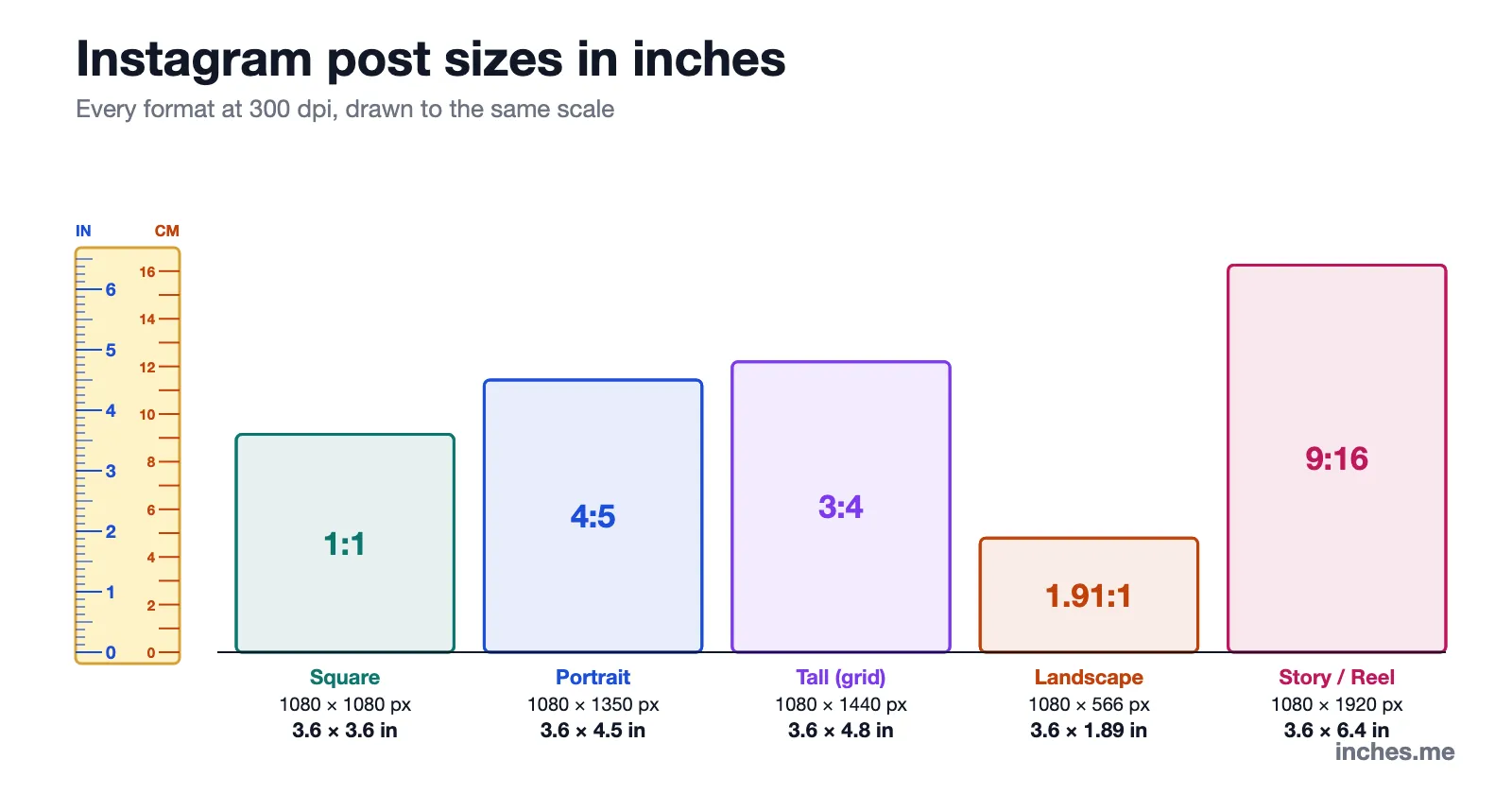
Instagram post sizes in inches: every format
Every format is 1080 pixels wide; only the height changes. Divide the pixels by the resolution to get inches.
| Format | Ratio | Pixels | Inches at 300 dpi | Inches at 150 dpi | Inches at 72 dpi |
|---|---|---|---|---|---|
| Square post | 1:1 | 1080 × 1080 | 3.6 × 3.6 | 7.2 × 7.2 | 15 × 15 |
| Portrait post | 4:5 | 1080 × 1350 | 3.6 × 4.5 | 7.2 × 9 | 15 × 18.75 |
| Tall post (grid size) | 3:4 | 1080 × 1440 | 3.6 × 4.8 | 7.2 × 9.6 | 15 × 20 |
| Landscape post | 1.91:1 | 1080 × 566 | 3.6 × 1.89 | 7.2 × 3.77 | 15 × 7.86 |
| Story or Reel | 9:16 | 1080 × 1920 | 3.6 × 6.4 | 7.2 × 12.8 | 15 × 26.67 |
| Profile picture | 1:1 | 320 × 320 | 1.07 × 1.07 | 2.13 × 2.13 | 4.44 × 4.44 |
Instagram accepts photos from 320 to 1080 pixels wide, with a shape between 1.91:1 (wide) and 3:4 (tall). Wider files are scaled down to 1080 pixels, and a shape outside that range is cropped.
Instagram post size in cm and mm
Same formats at 300 dpi, the usual setting for print, in metric units:
| Format | Ratio | Centimeters | Millimeters |
|---|---|---|---|
| Square post | 1:1 | 9.14 × 9.14 cm | 91.4 × 91.4 mm |
| Portrait post | 4:5 | 9.14 × 11.43 cm | 91.4 × 114.3 mm |
| Tall post (grid size) | 3:4 | 9.14 × 12.19 cm | 91.4 × 121.9 mm |
| Landscape post | 1.91:1 | 9.14 × 4.79 cm | 91.4 × 47.9 mm |
| Story or Reel | 9:16 | 9.14 × 16.26 cm | 91.4 × 162.6 mm |
Why an Instagram post has no fixed size in inches
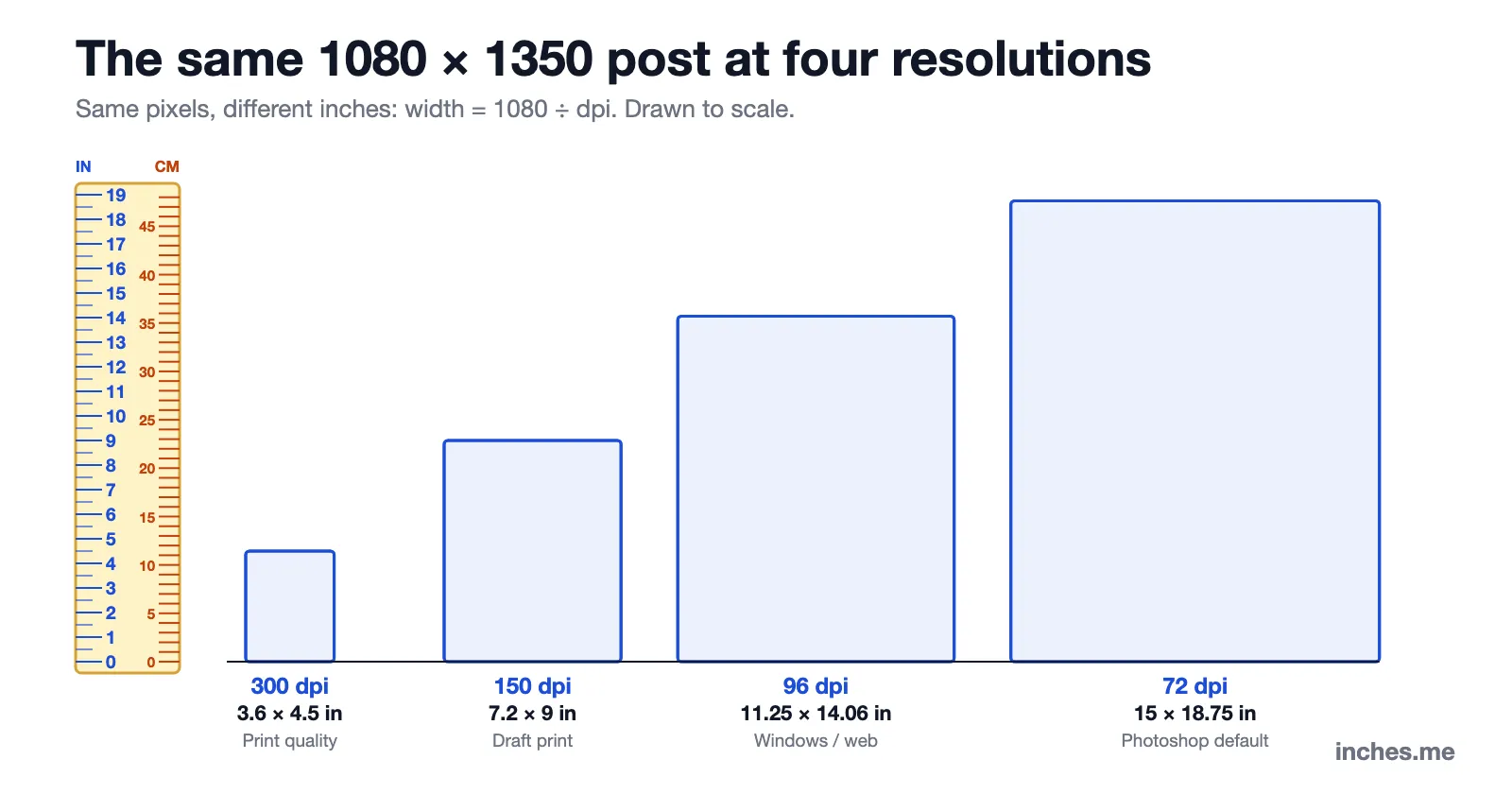
A digital image is a grid of pixels. It gets a size in inches only when you tell a program how many pixels go into one inch: the resolution, written dpi or ppi. The formula is simple:
inches = pixels ÷ dpi, so 1080 px ÷ 300 dpi = 3.6 in, and 1080 px ÷ 72 dpi = 15 in.
- 300 dpi is the standard for prints you look at up close: 1080 px makes 3.6 inches.
- 150 dpi is enough for photos seen at arm’s length: 1080 px makes 7.2 inches.
- 96 dpi is the Windows screen standard: 1080 px makes 11.25 inches.
- 72 dpi is the old Mac screen standard, still the default for web files in Photoshop and Illustrator: 1080 px makes 15 inches.
All four files above contain exactly the same 1,458,000 pixels and look identical on Instagram. Changing the dpi without changing the pixel count does nothing to the post.
Setting up an Instagram post in Photoshop, Illustrator or Canva
If your app asks for inches, enter a width and height that give 1080 × 1350 pixels at the resolution you pick. Any of these works:
| App | Size | Resolution | Result |
|---|---|---|---|
| Photoshop (print) | 3.6 × 4.5 in | 300 ppi | 1080 × 1350 px |
| Photoshop (web) | 15 × 18.75 in | 72 ppi | 1080 × 1350 px |
| Illustrator | 15 × 18.75 in | 72 ppi (1 pt = 1 px) | 1080 × 1350 px |
| Windows apps | 11.25 × 14.06 in | 96 ppi | 1080 × 1350 px |
| Canva, Figma, Procreate | work in pixels | — | 1080 × 1350 px |
- Photoshop: File › New, set the unit to inches, then 3.6 × 4.5 in at 300 ppi. Or switch the unit to pixels and type 1080 × 1350.
- Illustrator: an artboard of 15 × 18.75 inches equals 1080 × 1350 px, because Illustrator counts 72 points per inch and 1 point per pixel.
- Canva and Figma: they work in pixels. Choose 1080 × 1350 px and ignore inches.
- For square or tall posts, keep the width and change the height: 3.6 × 3.6 in (square) or 3.6 × 4.8 in (3:4) at 300 ppi.
Designing larger is fine: 2160 × 2700 px (7.2 × 9 in at 300 ppi) keeps the 4:5 shape and gives you a sharper master file. Instagram scales it down to 1080 px wide.
How big is an Instagram post on a phone?
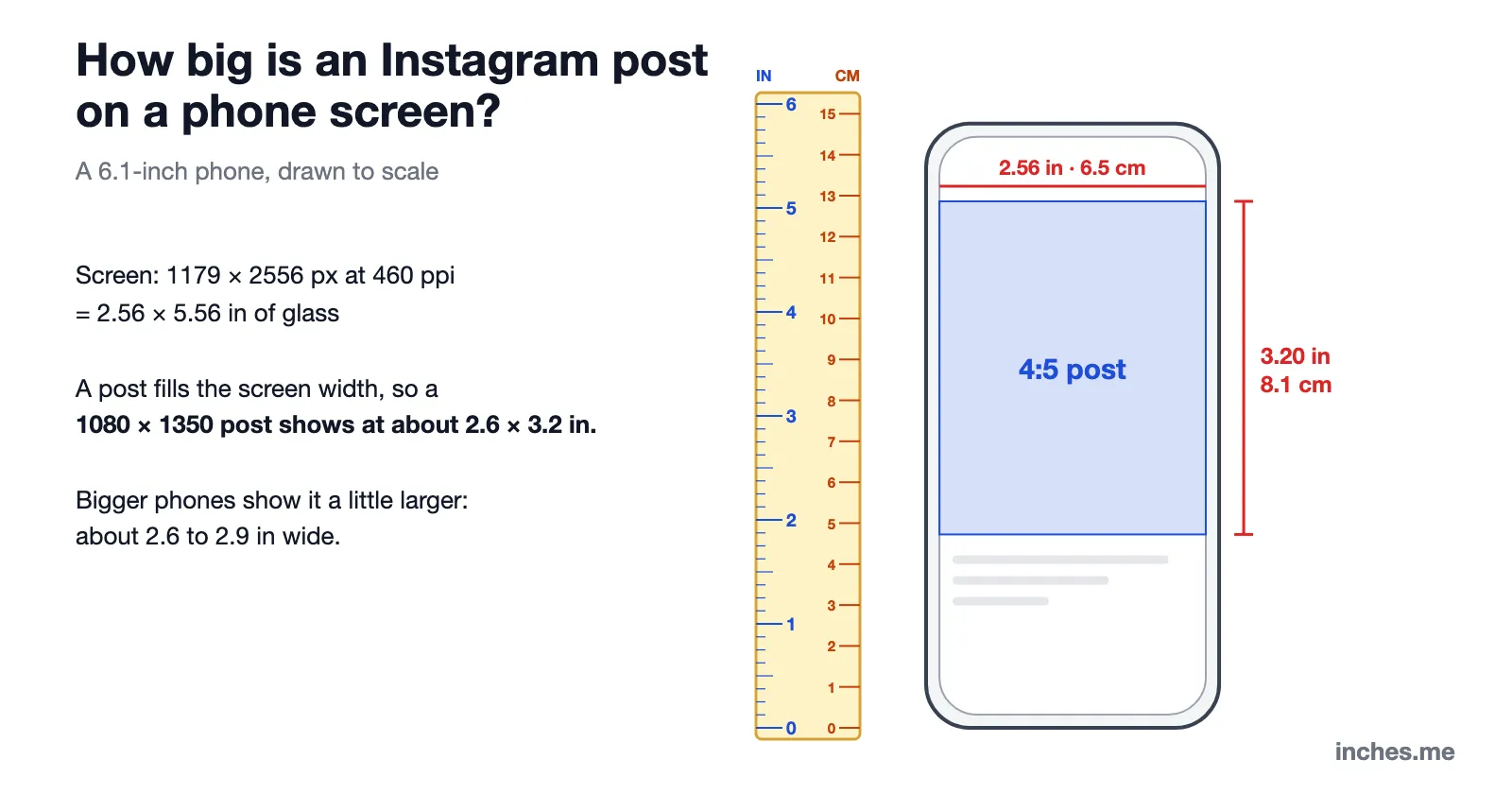
On the screen, a post fills the full width of the phone, whatever its pixel count. A typical 6.1-inch phone (1179 × 2556 px at 460 ppi) has a screen about 2.56 inches wide, so a 1080 × 1350 post shows at about 2.6 × 3.2 inches (6.5 × 8.1 cm). Larger phones show it a little bigger, about 2.6 to 2.9 inches wide. That is roughly the size of a wallet photo.
What size can you print an Instagram photo?
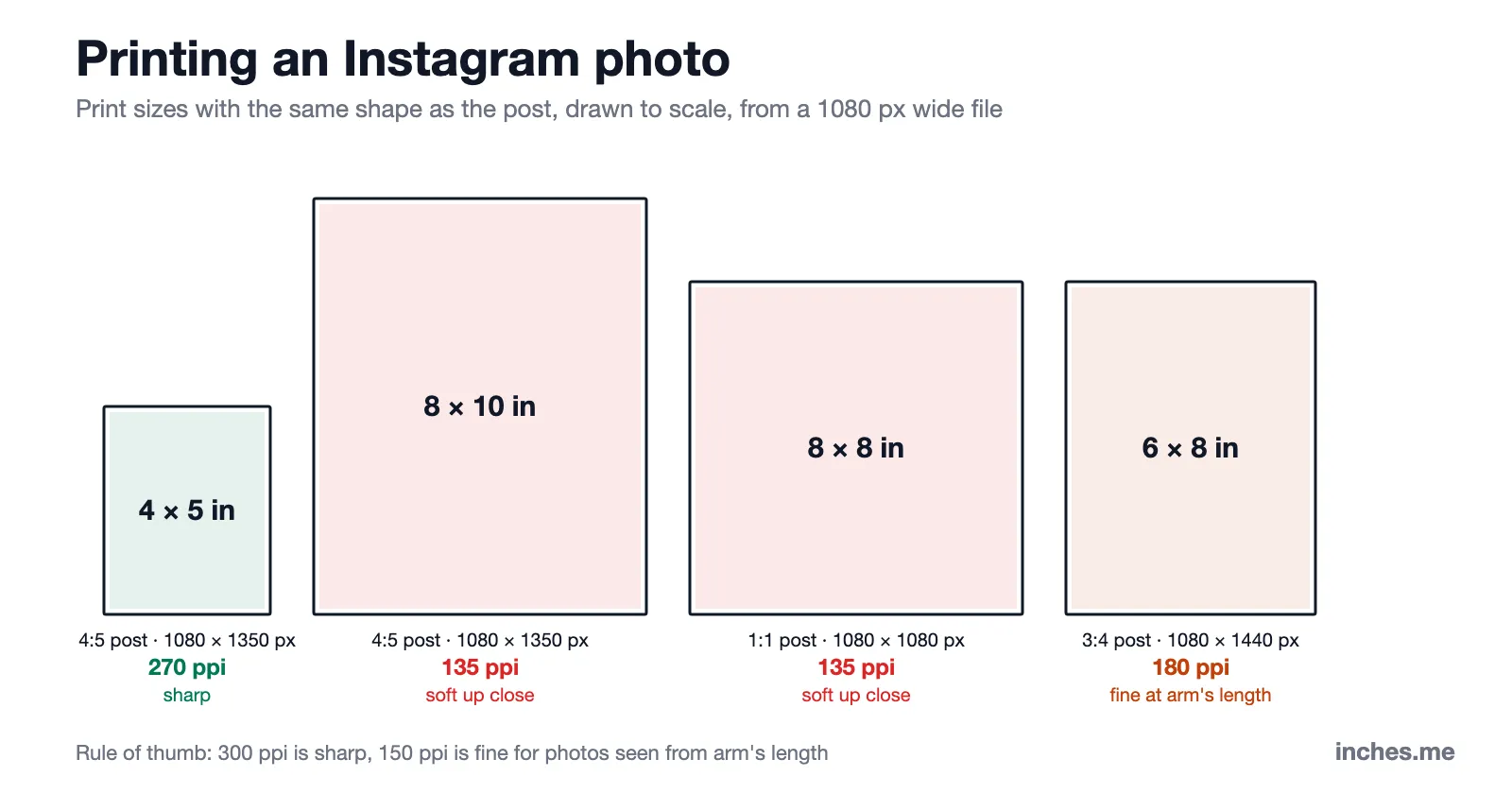
A 4:5 post has the same shape as an 8 × 10 inch print and a 4 × 5 print, so it fits those frames with no cropping. Square posts fit 4 × 4, 5 × 5 and 8 × 8 frames; 3:4 posts fit 6 × 8 and 9 × 12.
| Post | Print size | Resolution from 1080 px | Result |
|---|---|---|---|
| Portrait 4:5 | 4 × 5 in | 270 ppi | Sharp |
| Portrait 4:5 | 8 × 10 in | 135 ppi | Soft up close; print the original photo instead |
| Square 1:1 | 4 × 4 in | 270 ppi | Sharp |
| Square 1:1 | 8 × 8 in | 135 ppi | Soft up close |
| Tall 3:4 | 6 × 8 in | 180 ppi | Fine at arm’s length |
| Story 9:16 | 4.5 × 8 in | 240 ppi | Good; no standard frame size |
Instagram keeps only 1,080 pixels across, so a print from a downloaded post is sharp up to about 3.6 inches wide and acceptable up to about 7 inches. For anything bigger, print the original file from your phone or camera: a 12-megapixel phone photo is 4032 × 3024 px, enough for a sharp 10 × 13 inch print at 300 dpi.
The same 300 dpi rule sets the file size for printed cards: see Pokémon card dimensions for a 2.5 × 3.5 inch example.
Instagram Story and Reel size in inches
Stories and Reels are 1080 × 1920 px (9:16): 3.6 × 6.4 inches at 300 dpi, 7.2 × 12.8 inches at 150 dpi, or 15 × 26.67 inches at 72 dpi. In cm, that is 9.14 × 16.26 cm at 300 dpi.
The app draws buttons and captions over the top and bottom of the screen. Many designers keep text and faces out of the top and bottom 250 pixels or so, about 0.8 inch each at 300 dpi.
Profile picture size and the 3:4 grid
A profile picture is uploaded at 320 × 320 px and shown as a small circle: 1.07 × 1.07 inches at 300 dpi. Keep the subject in the center, because the corners are cut off.
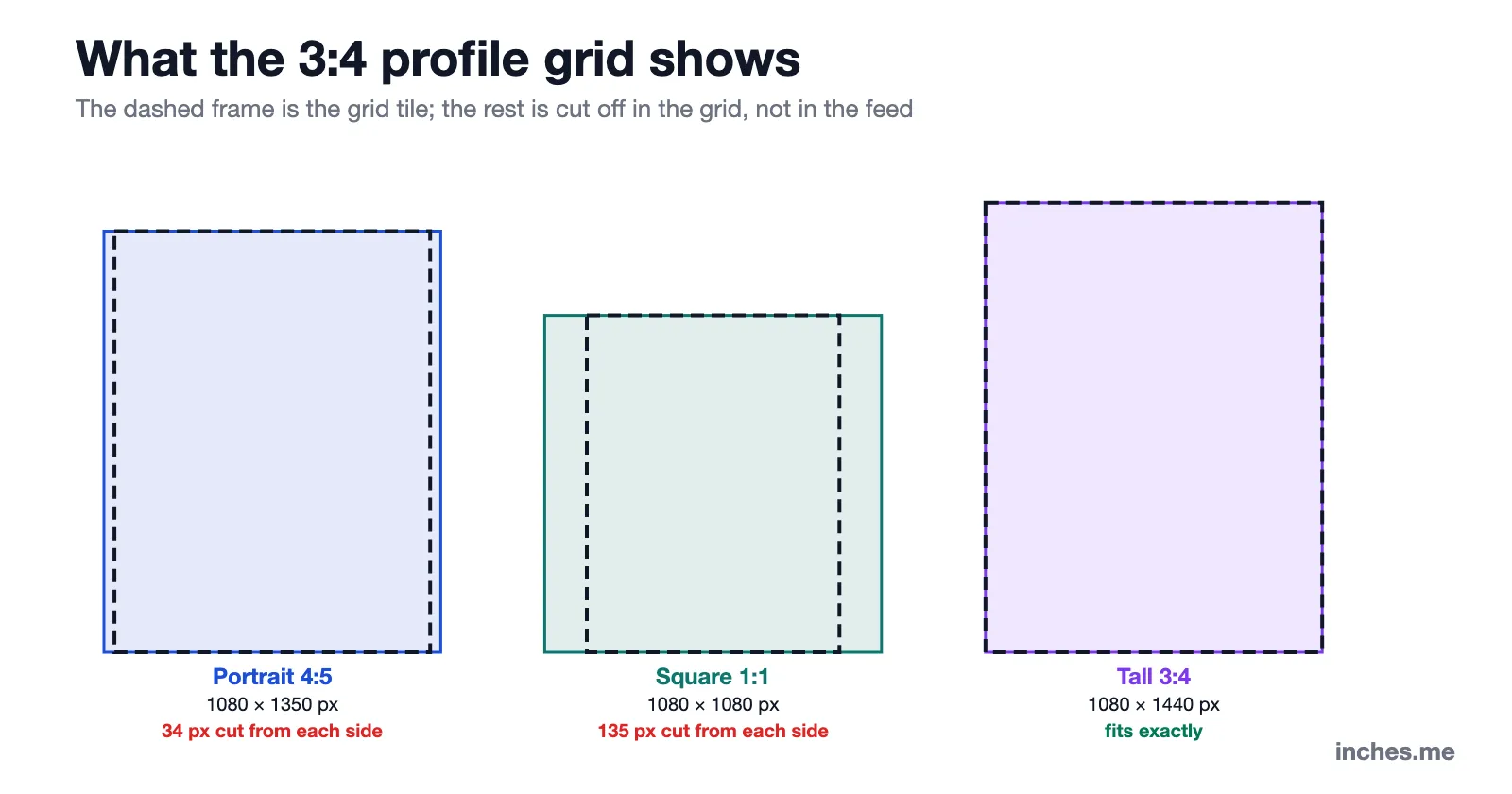
In January 2025, Instagram changed the profile grid from squares to taller 3:4 tiles, and since May 2025 it accepts 3:4 photos (1080 × 1440 px, 3.6 × 4.8 in at 300 dpi). The full post still shows in the feed; only the grid preview is trimmed. A 4:5 post loses about 34 px on each side in the grid, and a square post loses 135 px on each side.
For a carousel, every slide takes the shape of the first one, so set all slides to the same size, for example 3.6 × 4.5 inches at 300 dpi.
More sizes to compare
- What 5 inches looks like: 12.7 cm, from a 5-inch inseam to a 40d nail
- What 6 inches looks like: 15.24 cm, from a 6-inch sub to 6 inches of snow
- 20 cm in inches: 7.87 in, just under 8 inches
- Inches to cm converter: any length in inches, with a 1–100 inch chart and fractions
- Pokémon card dimensions: 63 × 88 mm, with sleeves and toploaders
FAQs
It depends on the resolution. A standard 1080 × 1350 px post is 3.6 × 4.5 inches at 300 dpi, 7.2 × 9 inches at 150 dpi and 15 × 18.75 inches at 72 dpi.
A square post is 1080 × 1080 px: 3.6 × 3.6 inches at 300 dpi, or 15 × 15 inches at 72 dpi.
A Story is 1080 × 1920 px: 3.6 × 6.4 inches at 300 dpi, or 15 × 26.67 inches at 72 dpi.
Use 3.6 × 4.5 inches at 300 ppi, or 1080 × 1350 pixels. Both give the same file.
At 300 dpi, a 1080 × 1350 px post is 9.14 × 11.43 cm, and a square post is 9.14 × 9.14 cm.
The shape fits: a 4:5 post matches 8 × 10 exactly. But 1080 px over 8 inches is only 135 ppi, which looks soft up close. Print the original photo for a sharp 8 × 10.
Converting your own numbers? Use the inches to cm converter or the cm to inches converter.